There is a lot of big news today, Evernote has a new iPhone client that is iPhone OS 3.0 specific. go to Evernote's Blog for more information.
More info as soon as I get my hands on this important productivity update!
Showing posts with label Touch OS. Show all posts
Showing posts with label Touch OS. Show all posts
Wednesday, June 17, 2009

Wednesday, March 18, 2009
v 3.0: Comparing Reality (or what was demoed) with my Wishlist!
On February 17 I put together an iPhone OS 3.0 wishlist and posted it to this blog, let's see how I fared by comparing the announcements from yesterday's (3/17/09) Apple Press conference.
Going Through my 2/17 Posting:
Going Through my 2/17 Posting:
- Copy/Cut & Paste, Check! This was a no-brainer, Apple had to add this at some point (it should have been in v 1.0). I think all iPhone power users are relieved that we will finally have this basic functionality.
- HomeScreen/Application Management. No Announcement, there was no mention of this during the press conference, it is possible we will see this as one of the 100 or so user improvements that were not discussed. As developers have loaded the beta copy of 3.0 on their phones, word is that there are a lot of new features that were not covered in the press conference. Although, it seems like a new Springboard would have been a big enough item that Apple would have demoed it. I guess we will have to wait until summer to find out. [Note: v 3.0 will implement system wide "Spotlight" search functionality, if the iPhone's Spotlight can be used like OS X's spotlight to launch applications, then application management may not be as important. Just launch Spotlight and type the first few letters of the app you want to launch.]
- Text to Speech at the OS level. No announcement, I think full TTS will require a bump in hardware, we may not see a move toward text to speech on the iPhone until processor upgrades. There was no specific mention of this capability at the press conference.
- User Selectable background processing. NO, this was the big rumor prior to the 3/17 press conference, I think the rumor got a lot of people excited, including myself. There are times where I would want to selectively choose to keep an app open as a background process, even at the expense of decreased battery life. It appears that Apple is not ready to give us this option yet, during the press conference, background notifications was discussed and demoed, while several reasons were given as to why you would not want true background processing.. so, NO selective background processing this summer!
- External Peripherals - Blue tooth or via the dock connector. CHECK! with some reservations, I am looking for an external keyboard! At first glance, this announcement seems to imply we will be seeing external keyboards this summer. But during the Q&A, Apple was asked specifically about the availability of a bluetooth keyboard, the iPhone OS is currently lacking human interface device (HID) drivers, Apple seemed unwilling to commit to HID drivers for 3.0. I do not think we can assume that external keyboards are a slam dunk, we will have to wait and see. FYI, I favor an external keyboard that connects to the dock connector over bluetooth connectivity, mainly for power consumption/battery life issues.
- System Settings Profiles. No announcement, again, we will have to wait and see if the settings application has any new functionality that was not mentioned in the press conference.
While reviewing above, there is only one definite out of the original 6 wishlist items, not a great batting average, but I am still excited about v3.0. Apple touched on a few other items that will be great for iPhone users: Spotlight search, landscape keyboard, improved calendar functionality, call logging, MMS, peer to peer between iPhones, turn by turn GPS, push notification, developer access to over 1000 new APIs, tethering, Safari improvements and interaction with accessories. It is looking like 2009 will be a great year for continued enhancements to the iPhone.
Tuesday, February 17, 2009
MWC '09 - My 2009 (Touch OS 3.0) Wishlist!
Mobile World Congress is running from Feb 16 thru Feb 19 in Barcelona Spain. Apple does not plan to have an official presence at the world's largest mobile communications trade show, but there are sure to be announcements that will either directly or indirectly impact the iPhone user/market. For instance, Dataviz is rumored to be set to announce the availability of Documents To Go for the iPhone. Documents To Go is essentially Office for handheld platforms. I used it extensively on the Palm OS and have been anxiously awaiting its arrival on the iPhone (or for Apple to release iWork for the iPhone). Besides a usable office type application (Word, Excel, PowerPoint compatibility, editing and syncing), what else would is needed to boost productivity with the iPhone in 2009?
My wish list for 2009, peripherals and Touch OS 3.0:
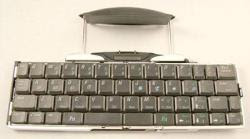
My wish list for 2009, peripherals and Touch OS 3.0:
- Copy/Cut & Paste. Several applications have included this functionality within the application. The iPhone Spreadsheet "Plus" has copy and paste and it is a pleasure to use.. Apple we need Copy & Paste at the OS level across applications.
- HomeScreen/Application Management. Ever try getting from the homescreen to screen six, seven or eight quickly? No a lot of fun. I am not sure what the answer here is, maybe nested icons that open a new screen directly from the main homescreen. Hopefully Apple has some UI magic up its sleeve to provide the iPhone power users with a better experience.
- Text to Speech at the OS level. I mentioned this in a previous post, since then Amazon has announced the Kindle 2 with text to speech. The idea of opening an article in Instapaper, Safari, AP Mobilenews or having newsfeeds/twitter posts read with the touch of a button is very appealing, perfect for the car or gym. Hopefully the Amazon Kindle 2 will push Apple to a degree.
- User Selectable background processing. This is one rumor that is making the rounds with regards to Touch OS 3.0. The idea is that you select one or two additional applications that are allowed to run in the background, similar to Apple's mail.app, the iPod application or the Nike+ application on the Touch G2. I hope this rumor has some substance behind it! I would use it to set Trails to geotrack my location when shooting photos, and not have to worry about the phone state.
- External Peripherals - Blue tooth or via the dock connector. Specifically an external portable keyboard, either wireless or connected to the dock connector! I have no problem with the onscreen keyboard for emails, texting or twittering. But the idea of editing an Excel or Word document in Documents To Go with half of the screen real estate occupied with a onscreen keyboard is not appealing. Palm had a fold able portable keyboard that connected with their Tungsten series of PDAs in the early 00s... I wish Apple would follow suit! Soon... Increased screen real estate for editing and true touch typing! Leave your laptop at home.
- System Settings Profiles. The ability to create & save profiles with specific system settings, for instance: dim screen brighness, shut down wifi and shut down the cell radio all with one selection. The current state, a user must go into Settings and set each item separately, and then reset to the prior state.

Sunday, November 23, 2008
iPhone 2.2 Update - Home Screen Shortcut
Now that we have been collecting/purchasing iPhone/Touch applications for 6 months, it is safe to say that most users have at least 3 screens of applications. With the 2.2 firmware update Apple added a useful shortcut: Press the HOME button from any of your home screens and you will be wisked back to your "primary" home screen. This enhancement saves having to flick thru 6 or 7 screens to get back to your primary screen (and presumably the home of your "go to" tools!).
The idea of organizing your applications by screen is enforced by the new home screen shortcut. With this blog I will be sharing with you my experience with iPhone/Touch applications, screen organization will be may method of rating aplications. For example, the new Google mobile application with voice input, on my iPhone is placed on the Primary Home screen, usually within one click from launch, as it truly provides "information at your fingertips" type functionality!
Subscribe to:
Posts (Atom)