Evernote has given us a significant upgrade to the iPhone client. Evernote 3.2 for iPhone adds the ability to select folders and store them locally on the iPhone (for premium users), giving you access to your notes when you have no network connection. Notes created on your iPhone in the Evernote client are stored locally by default.
Editing rich-text notes!? ... not quite yet, but in 3.2 you are given the option to append or to "copy", with copy, a text copy of the rich text note is created and you then edit the new text copy. The original rich text note is not lost, it is sent to the trash bin where it can be recovered.
Another new addition is the ability to search while the application is syncing notes, pre 3.2 I found it very annoying.. to launch Evernote with a search in mind, then have to wait for syncing to complete before I could proceed with the search... annoyance fixed! Thanks Evernote. Speed has been addressed as well, launch on my 3GS is now almost instantaneous.
Overall, it looks like a very good incremental upgrade to what I consider an incredible service! Evernote is my brain!
Showing posts with label Evernote. Show all posts
Showing posts with label Evernote. Show all posts
Thursday, December 24, 2009

Thursday, June 18, 2009
Evernote' s New version 3.0 iPhone Application
First off, the landscape notes view in Evernote 3.0 is stunning, you can scroll through icon sized images of all your notes with a few flicks of the screen.
The first thing you will notice when you open Evernote 3.0 the first time is that all of your notes load in a "All Notes" modes, no more loading and scrolling through 25 notes at a time. In portrait view there is an "Index Bar" floating on the right side of the screen (the index bar is along the bottom of the screen in landscape view), the index bar can be configured on the fly to group notes by: created or updated date, title (alphabetically), city or country (assuming your notes are geo-tagged), or by notebook. I have 300+ media rich notes and resorting by the grouping took less than 2 seconds - very impressive. To select the grouping press the "i" icon to the right of the search field. I found the notes grouping to be a good default view for the iPhone - mimicking the desktop view.
Search and advanced search have had their interfaces cleaned up and advanced search now offers an "Other" category that lets you filter by source, such as "Emailed to Evernote" or mobile, etc.
All is not perfect with this upgrade though, you still can not edit notes on the iPhone that contain "stylized text" or images - hopefully Evernote will find a solution for this with the new tools provided in iPhone os 3.0. Also, the voice note functionality has been reworked, the new interface is nice - fewer clicks to begin recording, but the sound quality of the recordings is poor. To compare, I used Apple's new Voice Memo application and emailed the recording to Evernote, the sound quality was superior to the recording from within Evernote - noticeably superior.. so much so, that I plan to use Voice Memo and email the audio file to Evernote, until the quality issue is addressed within the Evernote application.
For your notes that are geo-tagged, such as notes created on your iPhone 3G, you can now view your notes on a map. This feature is acccessible by pressing the push pin left of the search field. I am not sure how useful this will be for me, time will tell.
All in all, Evernote 3.0 is a great upgrade - highly recommended, I look forward to using Evernote 3.0 on the 3G S - the increase in speed should improve productivity, not to mention the improved autofocusing camera!
If you are already an Evernote user, there is no reason to skip this upgrade, if you have not used Evernote, now is the time to jump in! Evernote on the iPhone is like carrying a room full of filing cabinets in your pocket! In a word.. AWESOME!
Tuesday, April 21, 2009
Evernote for iPhone "101" Favorites
The Evernote iPhone application gives you access to the data you have stored on the Evernote "cloud" - thus by default, all of the data - sometimes gigabytes worth of data - is not stored on your iPhone. Typically this is a good thing, as you are not using up the limited storage space on your iPhone, but what about those instances where you do not have access to the cell network or wifi? (think - air travel)


Evernote for iPhone 2.0 has this situation covered, by using "Favorites" you can selectively choose the content you want stored locally on your iPhone. To leverage the Favorite functionality:
- Open the note you want to store as a favorite.
- Touch (select) the "circle-star" in the upper left corner, when selected the icon turns blue - placing the note in your favorites folder and hence, stored locally on your iPhone.
- To see you favorites, select the "Favorites" icon from the menu bar. (Note - the new note is placed at the bottom of the list by default).


Wednesday, April 1, 2009
Evernote for iPhone updated to 2.0
Evernote (EN) is an application that I keep front & center on my main home screen. I use Evernote daily, as an extension of my brain, the iPhone version in combination with the desktop clients combine to provide... "information at your finger tips." If you have not tried Evernote, I recommend that you check out Evernote's blog for a peek at the power of this application.
It has been several months since the Evernote iPhone application has been updated, the Evernote folks hinted at an imminent upgrade on a recent podcast. Well, low and behold, there it was on my App Store Updates screen.. Evernote 2.0! Let's review the enhancements/changes:
Highly Recommended
It has been several months since the Evernote iPhone application has been updated, the Evernote folks hinted at an imminent upgrade on a recent podcast. Well, low and behold, there it was on my App Store Updates screen.. Evernote 2.0! Let's review the enhancements/changes:
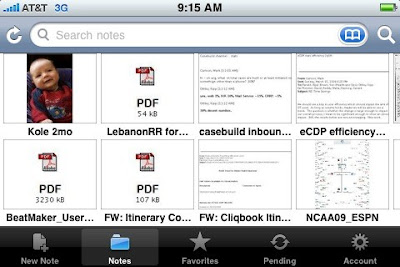
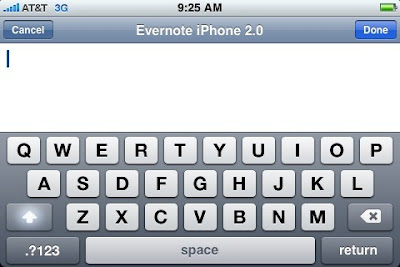
- LANDSCAPE Mode (See screenshots below)! Just flip your iPhone! You can now create & edit notes in landscape view using the larger landscape keyboard. You can also view the listing of your notes in landscape mode in a cool new thumbnail view. After an evening of using Evernote in landscape mode, this is a great enhancement, browsing through notes in the new thumbnail view feels natural and editing with the larger keyboard is a godsend.
- The "Favorites" functionality in the Evernote iPhone application allows you to selectively tag notes that you want to carry with you on the iPhone that will be available at all times, even without a network connection. With the new EN version, the favorites folder has been updated to allow you to edit the order that your notes are displayed. The developers also claim to have implemented "better offline support for favorites, including improved access to attachments." I have not had a chance to open an attachment yet (sans 3G/wifi access), but I do find the custom sort order a worthy enhancement, especially given how the favorite folders tends to grow with use.
- Numerous bug fixes and cosmetic improvements. The startup time has been improved and it is noticeable, geo-tagging accuracy has also been addressed, as has the stability of the built in browser.


Highly Recommended
Tuesday, December 23, 2008
Evernote - The Virtual Shoebox (RWU)
Do you have intentions of keeping all of your newborn's keepsakes/milestones organized for years to come? I did with our 2 year old... and failed miserably. Since the birth of our first baby I have started using Evernote both professionally and personally - Evernote is a digital junk drawer and an extension of your brain. It is the perfect medium to capture those special moments!
Our second baby is due February 2, 2009, my plan is to leverage Evernote as a virtual Shoebox for baby number 2! A place to track all of the milestones, laughs, giggles and everything that goes into raising a child!.
If you have not a had a chance to explore Evernote, I suggest you do so. It is a cloud application with clients for the iPhone, web, OS X and Windows, you store data in the cloud which is then synced to your various clients. With Evernote you can store text, pictures, files, video and audio clips. Your iPhone or mobile device, such as a laptop, can be used as the capture device. To capture first words, funny phrases, first steps, etc, then upload these events to Evernote.
As an example, for child number one I created a text note labelled milestones, I update the evernote as events occur, usually just a short sentence. You would be surprised how much fun it is to review these comments 6 months later!
With a scanner you can easily scan and upload birth certificates, newspaper birth announcements or anything else out there in the analog world that you want stored virtually (How to scan directly into Evernote: see the Evernote Blog). Uploading digital photos from iPhoto or Aperture is as easy as emailing! With Evernote, an email address is provided, email a photo to your email address and that photo lands in your Evernote account. I use this feature to add one picture every every month, creating a virtual timeline where you can observe "how fast they grow up."
You can keep all of this information secure, or you can publish the folder for open web access so that friends and family can view. At this time there is no option to publish with password, I am hoping that this feature is added soon.
A basic Evernote account is free, or a premium account is available for $45 per year and provides for 500 mb of data transfer per month.
Tuesday, December 16, 2008
A Bigger Brain! Leveraging Evernote

Twenty years ago when I entered the workforce, my modus operandi was to maintain a "brain book" - basically a 9x7 spiral project planner notebook. I entered information that I thought I would need to pull up in the future, as time went on I got pretty good at determining what information belonged in my brain book. Data entry was easy, finding the info - was not so easy!
As time progressed I replaced my brain book with a Palm Pilot, the Palm had decent search and data entry was OK, but it was missing a web component and the data was limited to text only.
Along came Evernote - the information "junk drawer", Evernote has Windows and OS X native clients, a web interface and now an iPhone application. Ubiquitous access to the information that you store in Evernote is the key to its usefulness. One of the best ways to think of Evernote is to compare it to your "junk drawer" of information with the caveat that mostly anything in that junk drawer is searchable (audio notes excluded).
Info In - the iPhone app lets you add text notes (this functionality will be more useful when Apple adds copy & paste to the Touch OS), pictures directly from the camera or camera roll and audio notes. You can also forward emails and documents to your Evernote account via an Evernote provided personal email address, for example email a PDF to Evernote and you now have access to it anywhere you have web access. With photos the Evernote servers will perform OCR on any text in the photo... taking a picture of a white board is an ideal use for this functionality, as the text is now searchable and you have a permanent record of the data on that white board. If you have a scanner at your desktop machine, scanning articles and uploading to the cloud is a snap! Getting data into Evernote is as simple as clicking a shutter button!
Info Out - the keys to a successful data storing system is having ubiquitous access to the data and having a fast, accurate search capability. Evernote answers on both fronts. With the iPhone app, as long as you have a data connection, you essentially have your complete information junk drawer in your pocket. On a laptop using the native client, once the data is synced down to the client, you do not need a data connection to peruse your information collection - ideal for those long flights. Evernote provides for tagging of individual notes, the ability to create static folders and to create smart folders. You can search across all of you documents, information retrieval is what you would expect from a first rate application.
The Cost? - The iPhone application is free, as are the client applications, there is a a free service that provides for 40 mb of data transfer per month, the free service will be good enough for a majority of folks, as 40 mb equates to 20,000 text notes or 400 mobile photos, although you may find Evernote such a useful tool that you may feel compelled to purchase the premium service. The premium option is $45 per year and provides for a data cap of 500 mb per month.
In conclusion, many folks have moved Evernote into one of the highly coveted "Dock" locations on their iPhone, I keep Evernote on the first home screen and find myself launching Evernote at least once a day. Moving forward - look for quick snippets on the blog of real world uses for Evernote, both stand alone and in combination with other cloud applications.
HIGHLY RECOMMENDED!
Subscribe to:
Posts (Atom)